
We may earn money or products from the companies mentioned in this post.
Affiliate disclosure: Red Iron Peak may earn a commission if you buy through our Hooga links.
In this Hooga ULTRA360 review, the $399 panel earns a shortlist spot if the simple switches on your current compact panel are what bother you. It adds group dimming, a touchscreen timer, and optional near-infrared pulsing in a panel under 13 inches tall.
Table of Contents
Keep your current panel if it already fits your routine. If you’re tired of moving a small panel around, a larger format makes more sense than this upgrade.
Mike Tolentino prepared this desk review for Red Iron Peak. We checked Hooga’s official listing, manual, and policies on November 8, 2026, plus earlier third-party reviews. We haven’t used or measured the panel ourselves.
We also found no evidence that this exact model produces better results than simpler panels. Hooga’s lineup comparison also cautions against inferring outcomes from those specifications. Extra wavelengths and higher listed irradiance don’t prove better outcomes.
Visit Hooga’s store and select the ULTRA360. The link opens Hooga’s homepage, so you’ll need to choose the ULTRA360 from the product menu.
What $399 gets you in the current ULTRA360
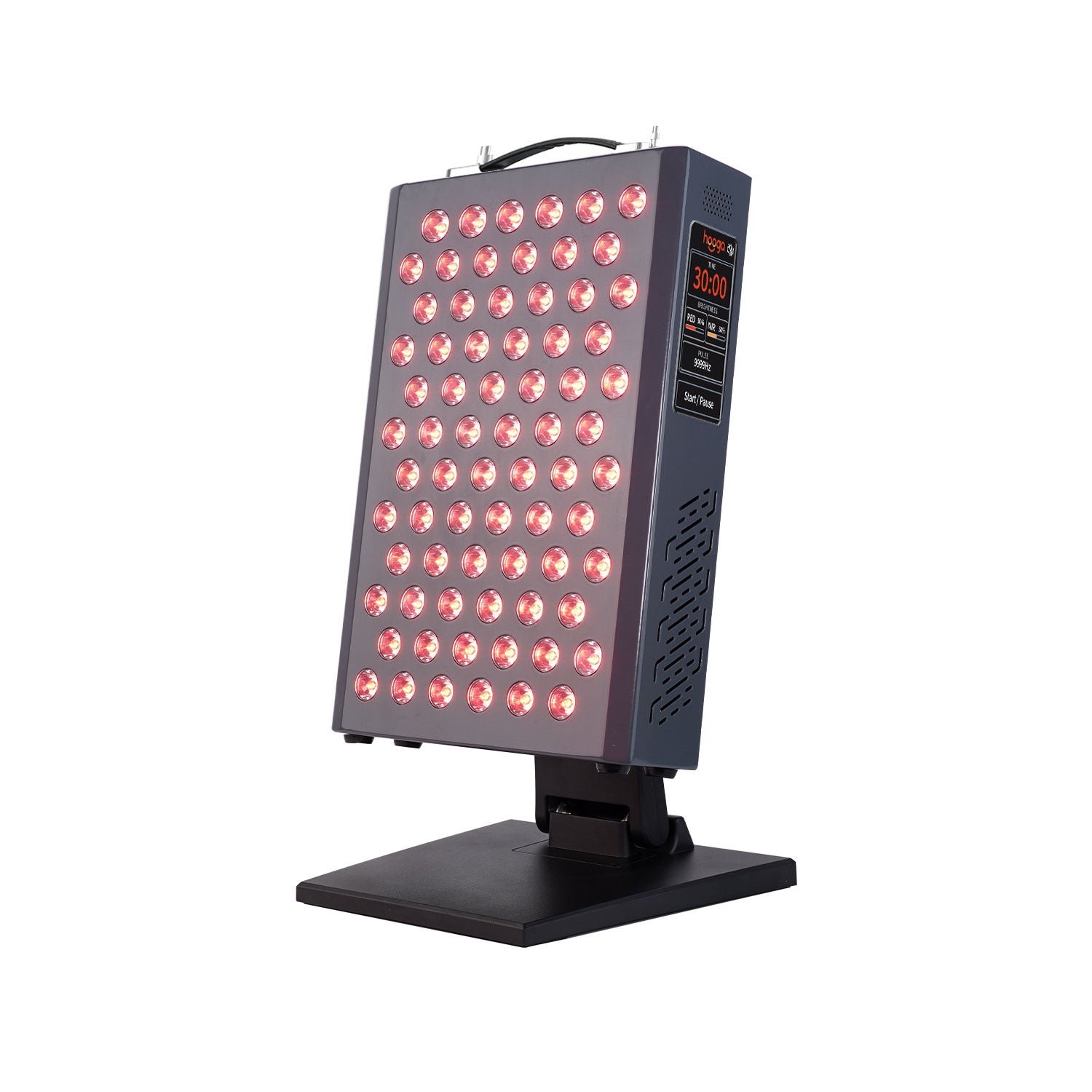
Hooga lists the ULTRA360 at $399 in the US as of November 8, 2026. It’s a separate product from the ULTRA750, ULTRA1500, and PRO300, so don’t mix up their specs or reviews.
On November 8, Hooga’s U.S. store data marked the $399 variant available, although the product page displayed both “Sold out” and “Add to cart.” Confirm availability and your delivered total at checkout.
| Spec | Hooga’s official listing |
|---|---|
| LEDs | 72 |
| Wavelengths | 630, 660, 810, and 850 nm |
| Size | 12.7 x 8.6 x 2.5 inches |
| Weight | 12 lb |
| Timer | 1 to 30 minutes, with 5, 10, and 15-minute presets |
The price makes more sense if you compare complete setups. For tabletop use, the included stand is the starting point, so there is no separate mount in the price comparison. If your intended spot is already occupied or too shallow, however, the included stand has little value to you. Measure the desk, shelf or counter before ordering and allow room behind the housing for the stand and the cord. The published housing depth is different from the footprint with the stand deployed. Hooga does not give a precise deployed footprint in the specification table, so ask for it if clearance is tight.
The listed 12-pound weight also matters if you plan to move the panel every time you use it. The carry handle gives you a place to grip it, while the weight still determines how easy it is to move between a desk and a storage shelf. Think about the route, where you would set it down and whether you want to leave it in one place. These are more useful purchase questions than counting emitters if your current panel already covers the area you want.
The price comparison uses new units and excludes location-specific tax. Hooga advertises free US shipping over $100, but the delivered total and eligibility can depend on your address and order. Check the cart for your address and the exact variant. This review uses the listed price without a coupon. Any sale or code should be confirmed in the order summary before you use it to compare prices.
What the ULTRA360 adds over a basic compact panel
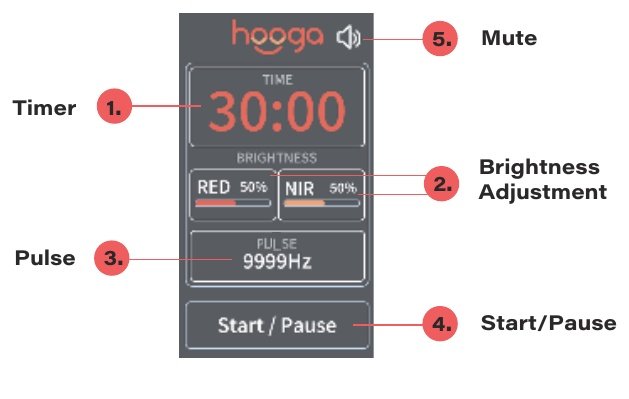
The upgrade is mostly about control. Basic panels like the HG300 use simple switches for red and near-infrared (NIR) light. The ULTRA360 lets you fine-tune both.
- Separate channels: run red only, NIR only, or both together.
- Group dimming: set red and NIR brightness separately. You can’t dim each wavelength on its own.
- Touchscreen timer: pick any length up to 30 minutes or tap a preset.
- Pulse option: NIR can pulse or run continuously. Red light doesn’t pulse.
- RF remote: start and pause sessions, plus mute the button sounds.
Hooga’s ULTRA Series manual describes a 1–100 Hz slider and manual entry up to 9,999 Hz. Elsewhere, it describes a 1–100 Hz range. Ask Hooga which is correct if a specific setting matters to you.
Older reviews describe a button controller with three dimming steps and a fixed 10 Hz NIR pulse. Current documentation shows a touchscreen instead. We could not verify when the change happened or which revision any specific order will ship with.
The practical difference is the number of settings you can change without repositioning the unit or using an external timer. If you want to switch between visible red alone and the combined mode, the HG300 already provides channel switches. The ULTRA360 controls are more relevant if you also want to adjust brightness separately for each group or have the panel stop at a selected time. In that case, ask whether you would use those settings regularly. A control you would leave at its default does little to justify the upgrade.
Red and near-infrared each contain two listed wavelengths. The interface gives you one brightness setting per group, so choosing a lower red brightness changes the red group. It does not give you an independent slider for 630 nm and another for 660 nm. The manual documents a displayed brightness percentage as a setting. It does not provide a table converting each percentage into measured output at a given distance.
For an order placed today, the useful question to ask Hooga is which controller the exact warehouse unit has. Ask whether the product currently shipping has the touchscreen pictured in the manual and request a photo of the controls or the matching manual revision if it affects your decision. The site documents the touchscreen version. The public listing does not identify the production date or serial number of the unit you will receive. Keep a copy of the seller’s reply and check the controller and included paperwork when the order arrives.
The remote offers a way to operate compatible ULTRA controls without reaching for the screen. If you already own an ULTRA panel and want to use the remote with both, ask Hooga whether your earlier model or revision is supported. Wireless operation is a control convenience. The tabletop housing still has no physical attachment to Hooga’s other ULTRA panels.
How much to trust the ULTRA360 irradiance numbers
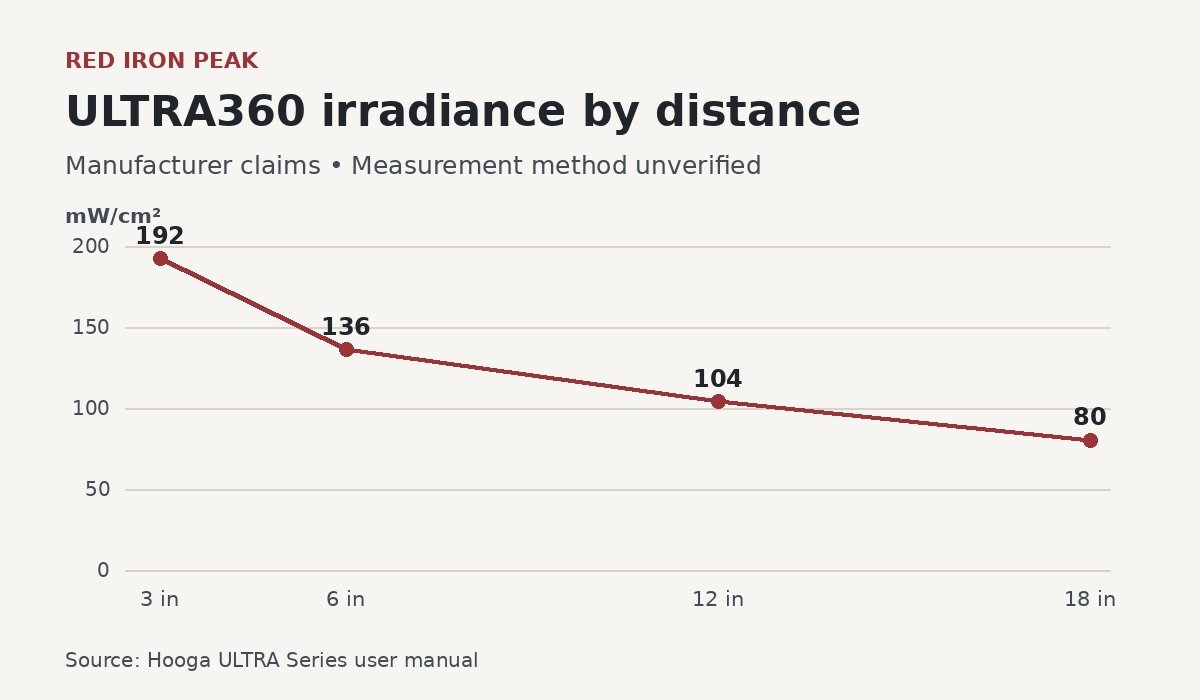
For this Hooga ULTRA360 review, we treated the manufacturer’s irradiance figures as claims with an unverified measurement method. Irradiance means how much light power reaches a surface, shown in milliwatts per square centimeter (mW/cm²).
| Distance | Hooga manual figure |
|---|---|
| 3 inches | 192 mW/cm² |
| 6 inches | 136 mW/cm² |
| 12 inches | 104 mW/cm² |
| 18 inches | 80 mW/cm² |
The manual doesn’t name the instrument, test grid, mode, or brightness used. It also doesn’t say whether these are peak or average readings. The product page adds a separate “over 132” claim at six inches.
One detailed outside test covers an earlier unit. Alex Fergus’s February 19, 2025 review reported spectrometer readings of 74 mW/cm² peak and 60 mW/cm² average. He discussed them against Hooga’s six-inch claim.
That test covered the earlier button-controlled unit, not today’s touchscreen version. Fergus received the panel free and discloses affiliate ties. His write-up doesn’t fully specify calibration, sampling grid, brightness, or pulse setting.
Wattage labels don’t line up either. The product page calls 120 W “output power,” while Hooga’s comparison chart lists 116.4 W consumption. The “360” in the name isn’t the panel’s wall power draw.
The six-inch manual figure is 136 mW/cm². The storefront describes the six-inch figure as over 132 mW/cm², which is compatible with 136 as a broad lower-bound claim. The useful uncertainty is how those readings were taken. Without the meter, mode and measurement area, you cannot tell whether the two sources describe the same setup or two different measurements. Neither gives a comparable area average for the panel on your desk.
The historical test illustrates why this distinction matters. Its 74 mW/cm² peak and 60 mW/cm² average differ by 14 mW/cm² within one report. A peak tells you about a single high reading, while the average depends on the sampled locations. You cannot calculate the current panel’s average by applying that 14-point gap to Hooga’s figure. You also cannot infer a specific meter from the difference alone. That would require confirmation of Hooga’s measurement method.
If output matters more to you than the interface, ask Hooga for a current-revision measurement report. The details to request are the unit revision, meter model, active channels, brightness settings, distance from the emitting face, and whether the figure is a center reading or an average. A measurement grid is particularly useful if you want to understand how readings vary across the area. If the response repeats only the headline specification, compare the panels on documented features and keep the output comparison provisional. See our guide to red and infrared light specifications for how those measurements differ.
The electrical figures need their own row in a comparison. A meter at the outlet measures how much power the device draws. Irradiance describes the light power arriving per area at a specified position. The comparison chart labels 116.4 W as consumption. Treat the storefront’s separate 120 W label as a different, insufficiently explained specification. Neither figure determines the dose at your position or proves better outcomes.
What’s in the box, and why it stays on a table
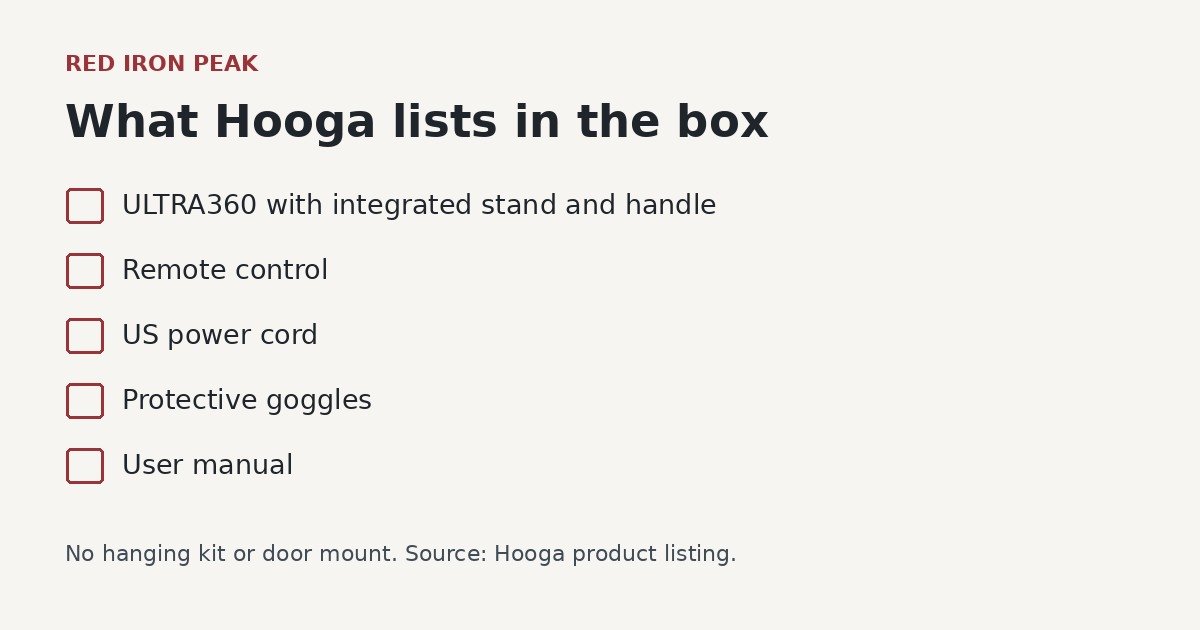
Hooga’s listing includes the panel with a built-in adjustable stand and handle. You also get a remote, a US power cord, protective goggles, and a manual. There’s no hanging kit or door mount, although one older review listed a door hanger.
Hooga says the ULTRA360 can’t attach to its mobile stands or to other ULTRA panels. Any wireless syncing between units isn’t the same as building a bigger physical setup.
The remote, cord and stand cover the basic tabletop setup described by Hooga. Before opening the package, compare the order confirmation with the included-parts list. If the ability to hang the panel is a requirement, the current listing gives a clear decision: Hooga includes no hanging kit or door mount for this model. A photo that shows a different ULTRA panel mounted on a stand does not establish compatibility for the ULTRA360.
A stable surface at the right height can make a small panel easier to use than a larger wall-mounted one. If you would need to improvise height or move the panel repeatedly to cover the area you care about, the small housing may create more setup work than it saves. Choose a different format if the integrated stand cannot reach the position you need. The published comparison outlines show housing size only and should not be read as a measurement of illuminated area.
ULTRA360 vs HG300 vs PRO1500: which Hooga fits you
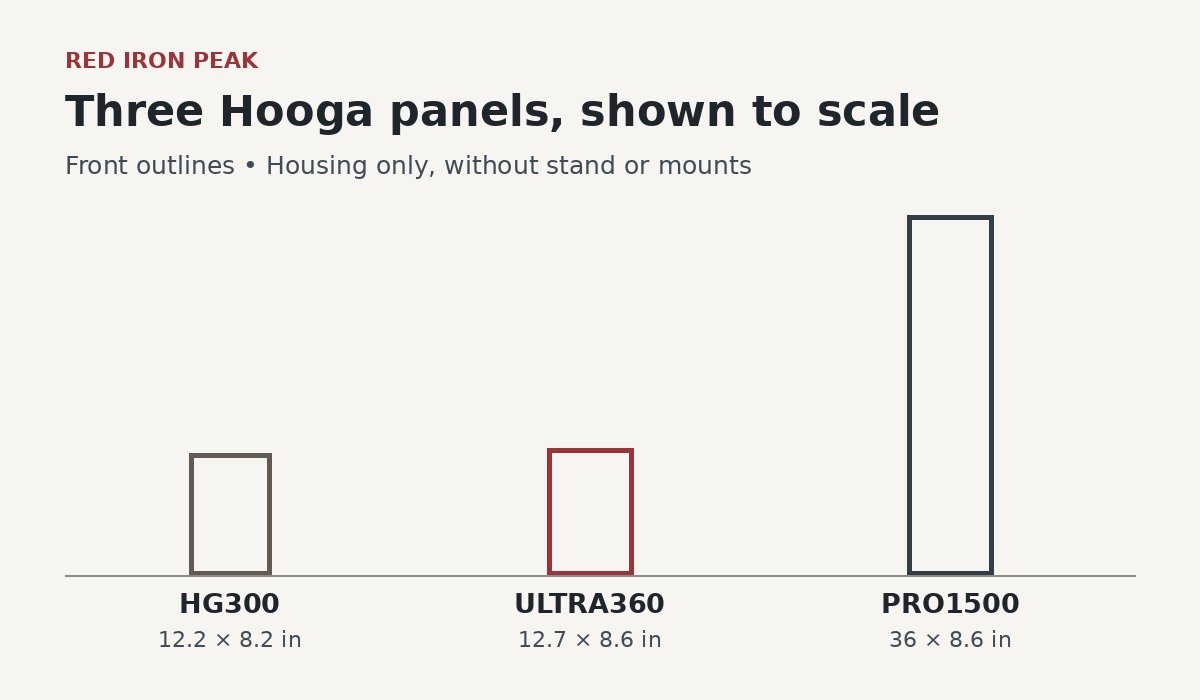
| Model | Price (Nov 8, 2026) | Format | Controls | Choose it if |
|---|---|---|---|---|
| HG300 | $199 | Compact, 60 single-chip LEDs, 660/850 nm, kickstand | Separate red and NIR switches | Basic targeted use is enough |
| ULTRA360 | $399 | Compact, 72 LEDs, four wavelengths, built-in stand | Group dimming, timer, NIR pulse | You want finer control in a small panel |
| PRO1500 | $1,199 | 36-inch, 300 dual-chip LEDs, 660/850 nm, door mount and pulley kit included | No ULTRA-style dimming or pulse | You want to light a larger area |
The ULTRA360 costs $200 more than the HG300, and that money buys settings rather than a bigger treatment area. If on/off switches already work for you, our Hooga HG300 review covers the cheaper option.
The PRO1500 costs $800 more, before its optional mobile stand. It lights more area per position, though no panel guarantees whole-body coverage from one spot. our Hooga PRO1500 review explains that tradeoff.
compare current Hooga panel prices on the official site
Returns, warranty, and other costs to budget for
Returns aren’t free. Hooga gives you 60 days from delivery but deducts its prepaid US return label cost from your refund. The policy doesn’t publish a fixed amount.
Hooga’s FAQ says there’s no restocking fee, so that deduction covers shipping, not a penalty. You’ll need original condition, original packaging, and every accessory. Damage or missing parts can mean a partial refund.
New ULTRA panels carry a three-year warranty that excludes misuse and drop damage. The warranty page says coverage starts at purchase, while the manual says delivery, so confirm the date with Hooga.
The manual also warns you may pay to ship a unit in for warranty service. Open-box units get one year of coverage and are non-refundable. No subscription is required, so ongoing costs are mainly electricity and optional accessories.
Before buying, keep two separate questions in mind. If you decide the format does not suit your space, you are looking at the return policy and the prepaid label deduction. If the panel fails later, you are looking at the warranty and whether you must pay to send it in. The same shipment can have different terms depending on which process applies. Ask Hooga for an estimate of the return label cost if it is important to your budget.
For a hypothetical example, a $399 order with a $30 return label deduction would produce a $369 refund before any other adjustment. The $30 is an illustration, not a Hooga quote. The actual amount depends on the applicable shipping rate and the condition of the returned order. Keep the original packaging and the included accessories so you can follow the return instructions if you need to.
Keep the order confirmation and delivery record. The warranty page uses the purchase date and the manual uses delivery. If those dates differ, ask Hooga which document applies to your order before relying on the later date. Also ask how it handles freight if the device needs service, and whether the answer differs for a defect reported immediately after delivery versus a later warranty claim. A lower open-box price comes with different terms, so make that comparison separately from the new-unit price.
Hooga ULTRA360 questions buyers ask
Is the ULTRA360 worth upgrading to from an HG300?
Only if the HG300’s simple switches hold you back. You’re paying for adjustment, not a larger panel or a proven better result.
Can red and NIR run separately, and does red light pulse?
Yes, each group runs alone or together with its own brightness. According to the current manual, only NIR can pulse.
Does it include hanging hardware or fit Hooga mobile stands?
No. It ships with a built-in tabletop stand only and can’t mount to Hooga’s mobile stands.
Are ULTRA360 returns free?
No. Return label costs come out of your refund, and missing accessories or damage can reduce it further.
Who the ULTRA360 makes sense for
The ULTRA360 suits a US buyer who likes a compact tabletop panel but wants control over brightness, timing, and pulsing. That control is its strongest benefit, and the HG300 doesn’t offer it.
Its biggest limitation is placement. The ULTRA360 is a tabletop unit, and Hooga says it cannot physically attach to its mobile stands or other ULTRA panels.
At $399, it’s fair value only if you’ll use the extra settings. Our research supports a conditional recommendation based on controls. Confirm stock and your manual version before paying.
check ULTRA360 availability on Hooga’s website